Enhance Image FX ModuleEmulate Photoshop Filters [update: Sept 22
*UPDATED: Sept 22, 2001
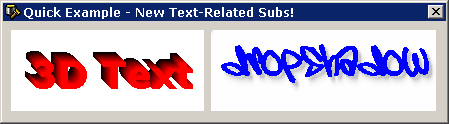
This clever module (BAS file) emulates some of Adobe Photoshop's most useful features and filters. Includes: Add Noise, Blur, Colorize, Darken, Flip Horizontal, Gradient, Invert Colors, Lighte, Merge, Merge Gradient, Pixelate (Mosaic). Now including: Replace Color, Stroke, TV Scan Lines; as well as Text Effects: 3D Gradient Text, Text with *REALISTIC* Drop-Shadows, Border-Only Text, Text with *REALISTIC* Outter Glows. Uses *ONLY* GetPixel and SetPixel. Check it out and please vote for me if you find it useful :] - Take a look at ths screen shot for examples. ZIP File includes only the module (BAS file). Sorry, didn't have time to code an example project :( Perhaps someone would like to do the honors and post it, if so drop me a line when it's finished? :) PLEASE please please leave comments/questions/suggestions :)
 (7(7 Vote))